A Summer Wreath Graphic for Elegant Craft & Product Illustration
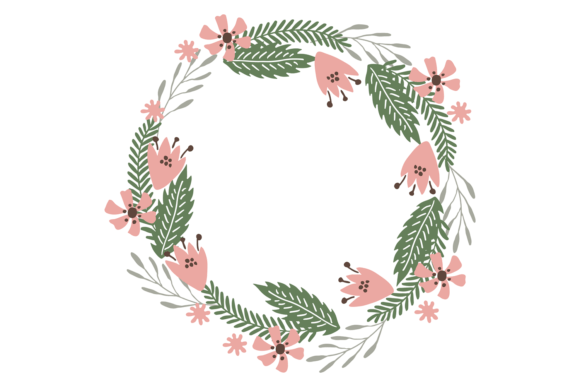
Every time I download a new graphic asset for my digital shops, I test it like a new material arriving at a workshop. The first question is simple: will this build sellable products? Opening the Summer Bouquet Wreath bundle, the immediate impression is one of soft elegance. This decorative floral circle isn't loud or overly rustic; it carries a gentle, feminine personality that feels both decorative and commercially versatile. It’s the kind of illustration that would appeal to buyers looking for a touch of seasonal charm without overwhelming boldness—perfect for shops targeting a market that values subtle, pretty design.
Testing the Design Across Product Types Before Listing
Before committing to a new product line, I run a design through several real-world scenarios. For this wreath graphic, I'd start by dropping the transparent PNG into a few key product mockups. How does it look as the central art on a cream-colored mug? Does it scale well for a large, printable wall art file? The isolated design means it's ready for these tests. The true value of a bundle like this—offering EPS, JPG, SVG, and PNG—is that you can stress-test it for different platforms immediately.
For Etsy sellers and print-on-demand creators, the SVG file is crucial. I'd import it into design software to check the cut lines if I'm planning Cricut projects like intricate paper crafts or vinyl stickers. The floral details need to be clear and not too fine to avoid cutting issues. For digital download shops, the high-resolution JPG becomes the backbone for printable items like greeting cards or planner stickers. The first practical step is always this multi-format check.
Prime Uses for this Floral Frame Graphic
This Summer Bouquet Wreath shines in applications where its decorative, circular composition can be a focal point. Think of it as a ready-made frame for your content. Here’s where I’ve found similar graphics perform best:
- Printable Products: Invitation templates, wedding or baby shower stationery, and wall art where the wreath can surround text or sit beautifully on its own.
- Merchandise Graphics: Tote bag prints, tumbler wraps, and t-shirt designs where the isolated artwork pops against a fabric color.
- Digital Design Assets: As a key visual in Canva templates for social media graphics, blog headers, or even as part of a digital paper pack.
- Sublimation Designs: Its detailed, colorful nature makes it a candidate for full-color prints on mugs, pillows, or polyester apparel.
- Seasonal Bundles: Pairing it with other summer-themed clipart in a marketplace bundle for creative entrepreneurs.
The “isolated on white background” description is a seller’s advantage. It means less prep work for product presentation. When creating listing images, you can quickly place the wreath on various mockup backgrounds to showcase its versatility, boosting customer trust and perceived value.
Where This Asset Supports Professional Presentation
Beyond the final product, a strong graphic design asset elevates your entire shop’s look. Using the Summer Bouquet Wreath in your own brand identity can create consistency. For instance, using a simplified version as a watermark on your shop’s promotional visuals, or incorporating it into the branding of your creative marketplace listings. A cohesive visual story tells buyers you’re a professional source.
For thumbnail appeal on Etsy or Shopify, this wreath can be effective. Its circular form creates a natural focal point in a square thumbnail. However, it’s vital to test this. I’d preview the listing image with the wreath at thumbnail size to ensure the details don’t become a muddy blur. Good visual hierarchy in a small image is key for click-through potential.
Practical Notes and Areas for Caution
Experience teaches you to look for the friction points. Here are my seller notes for this type of illustration:
- Always test print colors if using for physical products. Screens show colors differently; a soft peach flower might print more muted.
- Verify PNG transparency by placing it on a dark background. Any leftover white pixels around the edges will ruin a professional look.
- For Cricut projects or sticker designs, inspect the SVG paths. Are the inner flower petals too complex for clean cutting on a small sticker? Sometimes simplifying a design element is necessary.
- Organize the files clearly for your customers. If you’re selling this as part of a design bundle, label the EPS, SVG, etc., so buyers know exactly what they’re getting.
- Font pairing is an underrated skill. This wreath likely pairs well with a delicate script font for elegant products or a clean sans serif font for a more modern, minimalist greeting card. Test combinations.
- Most importantly, confirm commercial licensing of the original asset before you sell any finished products derived from it. This is the foundation of a legitimate small business branding operation.
Spotting the Limits to Avoid Product Issues
Not every design fits every application. The Summer Bouquet Wreath should be used carefully in certain contexts:
- Tiny sticker details: If you shrink the entire wreath for a 1-inch sticker, the intricate line work may become lost or cause cutting machine issues.
- Overly complex layouts: Using it as a background for a text-heavy template (like a multi-column event program) could make the layout feel crowded and reduce readability.
- Low-resolution print products: Always ensure the final output uses the high-res file. Never upscale the JPG for a large canvas print.
- Weak contrast situations: Placing it on a similarly toned, light pastel background might diminish its visual impact in a product mockup.
Understanding these limits isn’t negative; it’s pragmatic. It helps you create better products and avoid customer complaints about blurry prints or vinyl that doesn’t cut cleanly.
The Final Evaluation for Your Shop
From the perspective of an experienced digital seller, the Summer Bouquet Wreath graphic is a solid, versatile asset. Its mood is decorative and feminine, suitable for niches like wedding planners, lifestyle bloggers, home decor shops, and crafters. The inclusion of multiple file formats (EPS, JPG, SVG, transparent PNG) makes it a practical business tool, reducing your production time.
To integrate it into your shop successfully, follow a real testing protocol. Build a mock greeting card, see how it looks on a mug in your print-on-demand portal, create a simple Canva template using it, and check its scalability for a large digital download like wall art. This process tells you more than any preview image can. It reveals whether this floral circle will hold up under the demands of real commercial design work and help you build a more professional-looking, cohesive product collection for your handmade business or digital product shop.