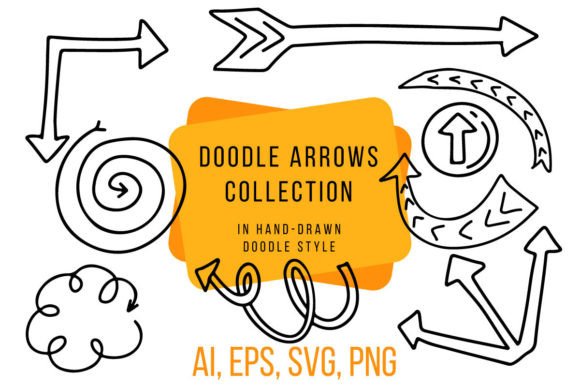
A Hand Drawn Doodle Arrows Collection for Commercial Graphics
As someone who regularly purchases digital assets for my online shops, my first impression of the Hand Drawn Doodle Arrows Collection is its immediate, playful personality. It feels distinctly handmade and accessible, not overly polished or corporate. This is a strong asset for creators targeting a niche that values a casual, creative, and slightly whimsical aesthetic. The arrows have a decorative, sketch-like quality that would attract buyers looking for designs that feel personal, friendly, and artsy—perfect for markets like Etsy or creative digital download stores.
Niche Appeal & Product Applications
The style here leans into the handmade and decorative. It’s not minimal or ultra-modern; it’s charming. For sellers, this means the asset excels in product categories where personality is key. Think of crafting a new seasonal bundle for your Shopify store or preparing a set of printable planner inserts for a Creative Fabrica shop. The arrows can become core decorative elements.
Here are concrete product-selling situations where this collection could be tested:
- Printable & Digital Products: Instant applications include printable wall art, digital scrapbooking kits, and PDF invitation templates. The PNG files at 300 DPI are ready for this.
- Merchandise Graphics: For print-on-demand, test these as t-shirt graphics, tote bag prints, or mug designs. The hand-drawn style often resonates on casual apparel and home goods.
- Craft & DIY Projects: For Cricut users, the provided AI and EPS files are crucial for creating SVG designs for cut vinyl, like planner stickers or decorative tumblers. Always verify the cut lines in your software before finalizing a project.
- Digital Product Creation: This is a prime candidate for inclusion in Canva template kits or as part of a larger clipart bundle for other designers. The 27 individual PNGs offer good variety for building a themed product.
- Marketing & Presentation: Use these arrows in your own social media templates and blog graphics to promote your products. They can enhance the visual storytelling of your brand.
Testing the Asset in a Real Shop Scenario
Imagine you’re preparing a new “Creative Planner” digital download pack for your Etsy shop. Before publishing the listing, you would integrate these doodle arrows into your designs. The practical test process is straightforward but vital.
- Mockup Preview: Place the arrows on a real product mockup—a preview of a planner page or a greeting card. Observe if they enhance the layout without overpowering it.
- Thumbnail Appeal: Create a potential marketplace thumbnail using the design. Does the hand-drawn style create enough visual interest and click-through potential at a small size?
- Background & Contrast Check: Test how the PNGs look on both white and dark backgrounds. Some sketched elements may lose clarity on very dark surfaces.
- File Verification: Open the AI and EPS files to confirm they are clean for commercial design work. Check the PNG transparency is true and doesn’t leave faint edges.
- Font Pairing Test: To gauge versatility, pair the arrows with different font styles. They likely pair well with a complementary handwritten font or a clean sans-serif for balance.
Where This Graphic Design Asset Works Best
The Hand Drawn Doodle Arrows Collection shines in applications where its decorative nature is a feature, not a distraction.
- Themed Bundles & Seasonal Collections: It can help build visual consistency across a product line, like a “Spring Planning” bundle.
- Printable Products & Digital Downloads: The high-resolution PNGs are built for this.
- Product Presentation & Mockups: Using the arrows in your own listing images can improve perceived value and brand identity.
- Social Media Promos & Blog Graphics: They add a quick, creative touch to promotional visuals without requiring custom illustration.
Practical Considerations & Seller Notes
While versatile, certain uses require careful thought to maintain quality and customer satisfaction.
- Tiny Details: For very small elements, like minute sticker details, the sketchy lines might become fuzzy or indistinct.
- Clean Cutting Projects: For intricate Cricut or Silhouette SVG designs, you must inspect and potentially simplify the vector paths from the provided files to ensure clean cuts.
- Crowded Layouts: Avoid using too many arrows in a single, text-heavy template. They are decorative and can clutter the visual hierarchy.
- Low-Resolution Output: Never use these for products requiring very low-resolution prints; the 300 DPI PNGs are for quality output.
Always confirm the commercial license terms before selling your finished products. Organize the files clearly for your own workflow and, if you are reselling them as part of a bundle, for your customers. A final, crucial step is a test print on a physical product like a sample mug or a printed page to verify color rendering and scale.
Building a More Professional Product Collection
From a business-minded perspective, this doodle arrows asset is a tool for efficiency and cohesion. It allows a small business owner or creative entrepreneur to quickly deploy a consistent visual theme across multiple products—from digital paper packs to packaging design elements. It helps you move from a single product listing to a curated, professional-looking collection. The key is to treat it as a foundational graphic design asset, testing its limits and strengths across your intended product range before launch. This approach builds customer trust through consistent, well-executed design and ultimately supports a stronger, more viable handmade business.